Who needs a website? Get DaClerk

A clerk for your customers. And one for you.

Customers ask and order from your real inventory. You ask DaClerk about your shop and snap an invoice instead of typing it.

Plans from $150 a month · See pricing →Run a restaurant? Meet DaWaiter →

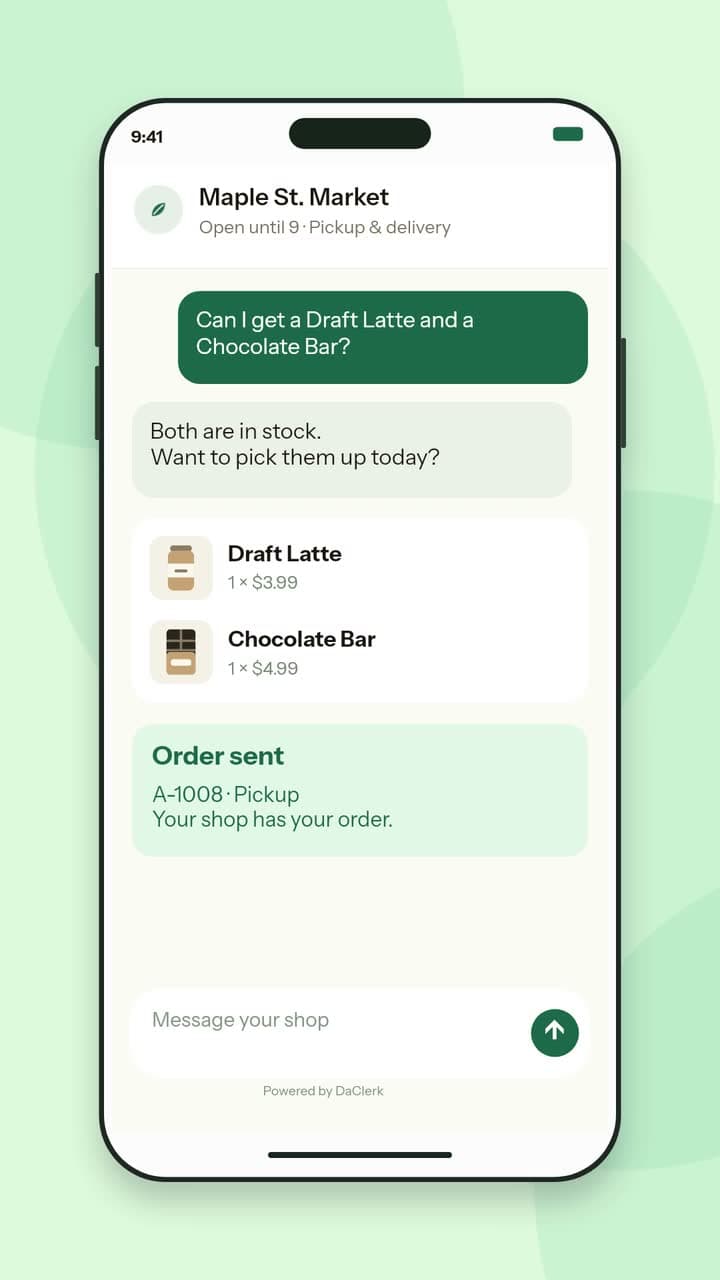
A short video: a customer orders a Draft Latte and a Chocolate Bar in the shop's chat, the order lands on the staff orders board, then the products, customers and reports screens.

Two products. One back office.

For shops

DaClerk

Your shop’s own website, at its own web address, with nothing to download and an AI clerk built in. The clerk is linked to your whole back office: your real inventory, a regular’s last order, the orders on your board. In your admin, it manages your inventory and adds new items from a photo.

For restaurants

DaWaiter

Your restaurant’s own website, at its own web address, with nothing to download and an AI waiter built in. It knows your menu, builds the order with your guests and sends it to your kitchen board.

DaClerk in your admin

Now it works your side of the counter too.

Ask in plain words. It answers from your own orders, inventory and customers.

A short demo: the owner asks DaClerk what sold best this week and gets the top sellers, then sends a photo of an invoice. DaClerk lists each line to check, one line needs a pick, and the counts save only after Confirm.

  • Ask about your shop

    Sales for any date range and your top sellers, what is running low or sold out, what shoppers asked for that you didn’t have, any order by number, any customer and their last orders.

  • Snap an invoice

    Take a photo of an invoice, a packing slip or a handwritten note, or upload a screenshot. It matches each line to your products and fills in the counts for you to check.

  • New product from a photo

    Photograph something new and it drafts the product for you to check.

  • Small edits by asking

    Change a price, an inventory count or an order status in one line.

  • Ask how

    Not sure where a setting lives? Ask DaClerk and it walks you through your admin.

Nothing saves until you confirm.

On Pro and Max. Lite gets it for its first week.

Running in production as of October 2026: real inventory, real customers, real orders at the counter.

1,778products in live catalogues
18,093customer contacts imported on day one

How it works

Customers just ask

No menus to dig through. They type what they’re after and the clerk answers from your actual inventory: prices, flavors, and stock that’s live, not last week’s.

Orders land at your counter

Pickup or delivery, with the customer’s name and phone attached so handover is painless. They pay in store, the way your regulars already do. On Pro and Max, delivery runs go out in the best driving order, with directions for each stop and an email to the customer when it leaves and when it arrives.

Run it from your phone

An orders board, products, and customers: an admin for your staff that works on any phone behind the counter. No new hardware, nothing to install. Scan a barcode with the phone’s camera or any USB or Bluetooth scanner and the item lands on the order.

DaClerk in your admin

Ask in plain words about sales, top sellers, low inventory, orders and customers. Snap an invoice and it fills in the counts for you to check. Photograph something new and it drafts the product. Change a price, a count or an order status by asking. Nothing saves until you confirm. On Pro and Max. Lite gets it for its first week.

Your shop stays yours.

DaClerk isn’t a marketplace and doesn’t sit between you and your customers. It’s your storefront: your name, your goods, your prices, with a clerk who never goes home.

  • Your own domain

    The storefront lives at your shop’s web address. Your name on the door, not ours.

  • Your customers come with you

    We import your existing customer list at onboarding. One shop brought 18,093 contacts (September 2026).

  • Your brand up front

    The storefront wears your name and look. White-label is available when you want us invisible.

  • Restricted goods, handled right

    Age-restricted items stay behind an ID check at the counter, where it belongs.

The whole counter, in your pocket.

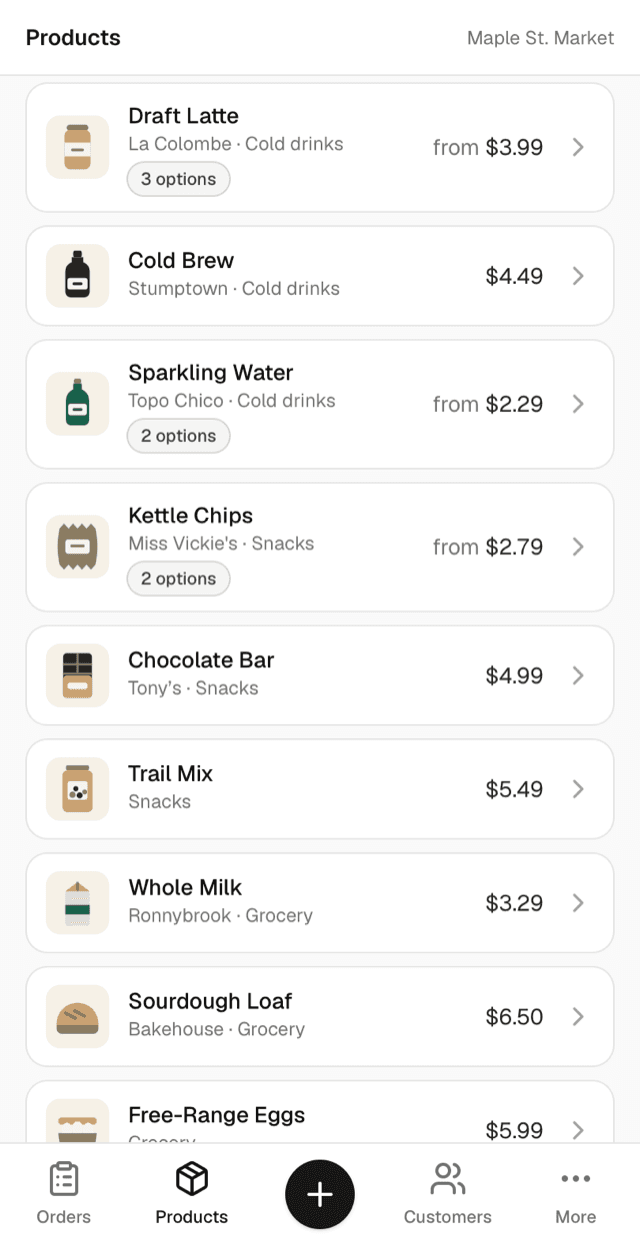
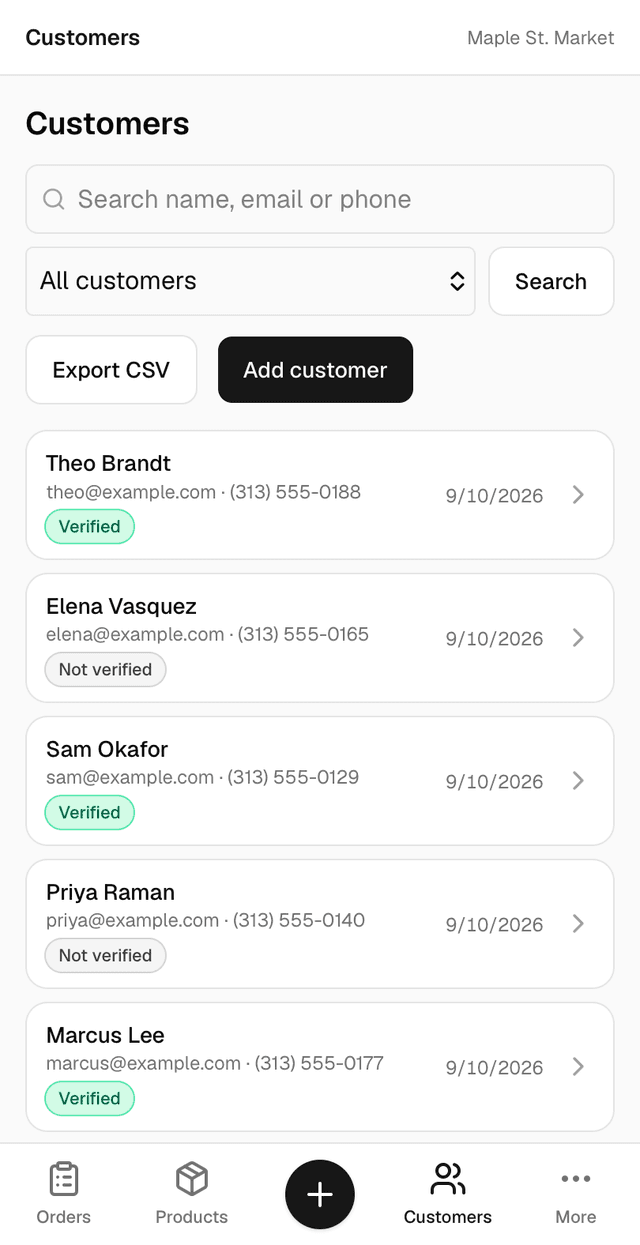
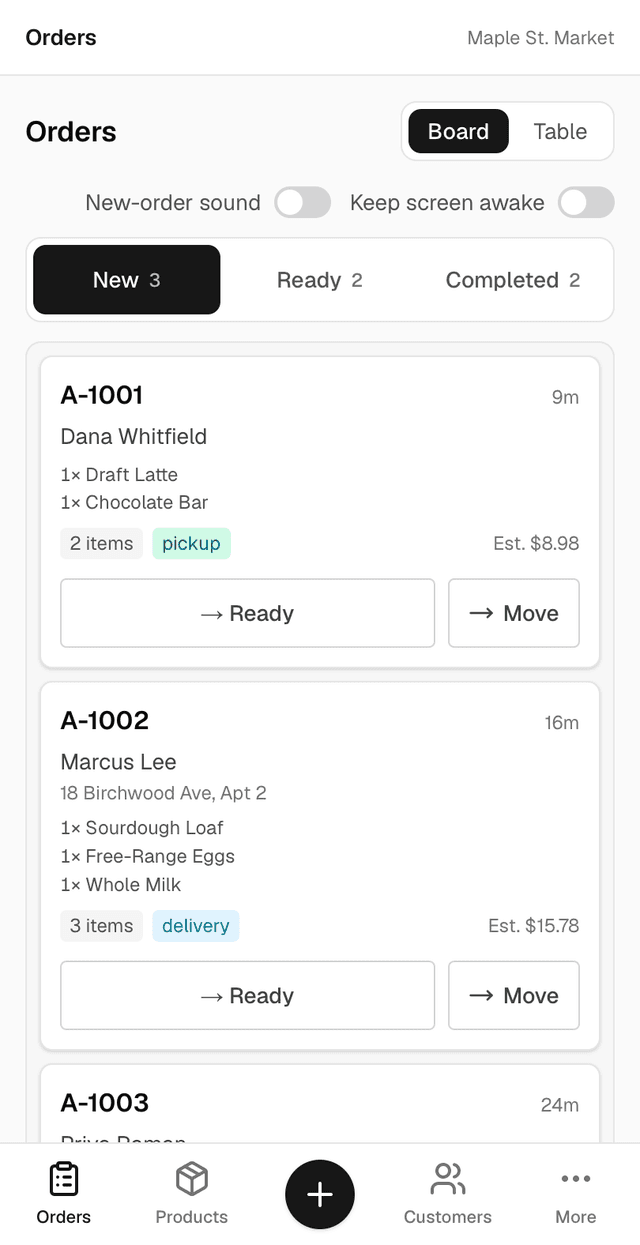
Your staff install the admin straight from the browser: no app store, no new hardware. Orders land on a live board, inventory edits take seconds, and every customer is a tap away. These are real screens from the admin.

The DaClerk admin orders board on a phone, showing incoming orders as cards
Orders on a live board
The DaClerk admin products screen on a phone, listing products with prices and options
Products and stock
The DaClerk admin customers screen on a phone, listing customers with verified badges
Every customer, a tap away

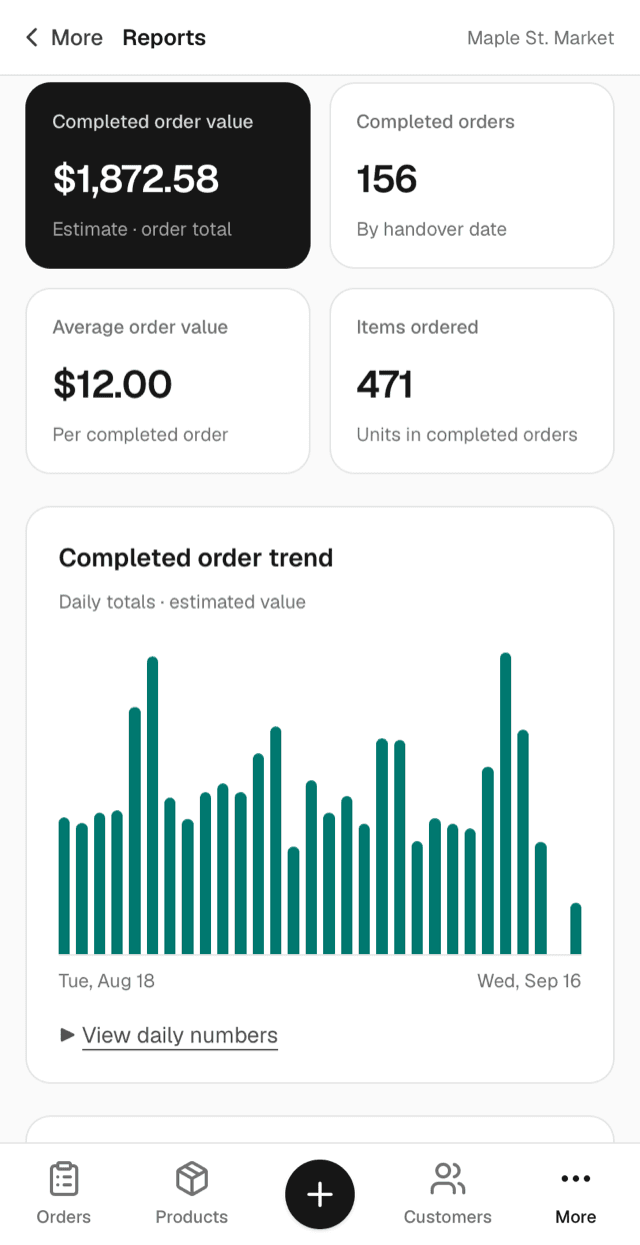
Know your numbers.

Reports are part of the same admin — no export, no spreadsheet. Every figure is counted from your own orders and your own shelves the moment you open the page.

The DaClerk admin reports screen on a phone, showing order value, order count, average order value and items ordered above a daily sales chart
  • Stock priorities

    What sold out today, and what is running low and still selling, shelf by shelf.

  • Inventory activity

    Every stock count someone changed by hand, with the name and the time.

  • Catalogue health

    The details that need a second look: an option priced far under its product, a flavour spelled two ways, a size missing from a set.

  • Nightly emails

    Low stock and stock count changes, sent to up to ten addresses each night. Yours to switch on.

Questions

What is DaClerk?
DaClerk gives your shop its own website with an AI clerk built in. The clerk is linked to your whole back office, so it answers from your real inventory, your orders and your customers. In your admin, DaClerk also manages your inventory and adds new items from a photo.
What is DaWaiter?
DaWaiter is the AI waiter in DaClerk, for restaurants. It knows your menu, answers questions about your dishes, builds the order with your guests and sends it to your kitchen board.
Who is it for?
Local shops and restaurants that want customers to ask and order in their own words, with every order landing on one board: for pickup or delivery in a shop, at the table or for pickup in a restaurant.
How much does it cost?
Plans are $150, $300 or $500 a month, plus one $1,500 setup fee when you go live. Pricing has what each plan includes.
How does setup work?
We do it with you: your shop settings, your products and customers loaded, the clerk tested on your own products, your staff shown around. You see it running before it goes live.
Does it take payments?
In a shop, the clerk takes the order and payment stays however you take it today: at the counter, at pickup or on handover. No money moves through us. A restaurant on DaWaiter can also let guests pay online, straight into its own Stripe account.
Put a clerk in your shop.

We set it up with you: inventory, customers, domain. You keep selling at the counter, the way you always have.

DaClerk.com · support@daclerk.com

Book a demo

Leave your number and we will call you.

See our Privacy Policy.